

TL;DR:
- Telehealth provides quick, accessible virtual medical care using devices with cameras and a stable internet.
- Preparing with proper tech setup, privacy, and medical info ensures a smooth first virtual visit.
- Affordable platforms like Sesame, Amwell, and GoodRx Care offer cost-effective options for non-emergency health needs.
Missing a doctor’s appointment because you couldn’t get time off work, or skipping care entirely because the copay felt too steep, is more common than it should be. Telehealth changes that equation. Virtual care gives you access to licensed providers from your phone or computer, often the same day, without waiting rooms or surprise bills. But getting your first visit right takes a little preparation. This guide walks you through everything, from the tools you need to the best affordable platforms available, so your first virtual visit feels smooth, not stressful.
Table of Contents
- What you need for a smooth virtual visit
- Step-by-step virtual care setup process
- Affordable providers: Choosing the right virtual care service
- Troubleshooting and overcoming common virtual care hurdles
- Our take: What most guides miss about virtual care setup
- Next steps: Finding fast, affordable virtual care
- Frequently asked questions
Key Takeaways
| Point | Details |
|---|---|
| Prep technology early | Test your camera, microphone, and internet connection before the visit for a smoother experience. |
| Choose affordable providers | Platforms like Sesame and GoodRx Care offer transparent low pricing with no hidden fees. |
| Know your backup plan | If video fails, switch to an audio-only call to keep your appointment on track. |
| Ensure privacy | Pick a quiet, private spot to protect your personal health information during the visit. |
What you need for a smooth virtual visit
Now that you know how virtual care can help, let’s make sure you’re ready with everything you need for a seamless first visit. The good news is that the requirements are simpler than most people expect. You likely already have most of what you need.
Technology essentials
For understanding telemedicine basics, start with your device. You need a smartphone, tablet, or computer with a working camera and microphone. A stable internet connection matters too. Most platforms recommend at least 5+ Mbps internet speed to avoid dropped calls or frozen video. If you’re unsure about your speed, a quick search for “internet speed test” gives you a free result in seconds.
Your environment matters
Choose a quiet, well-lit space where you can speak freely without interruption. Natural light or a lamp facing you works better than a bright window behind you. Privacy is important, both for your comfort and for HIPAA compliance, which means your health information stays protected.

Medical information to gather
Before your visit, pull together:
- A current list of medications and dosages
- Your recent symptoms, including when they started
- Any allergies or past diagnoses
- Your insurance card or payment method
- A short list of questions you want answered
Having this ready saves time and helps your provider give you better care. The official patient prep checklist from the U.S. Department of Health and Human Services confirms that gathering this information ahead of time leads to more productive appointments.
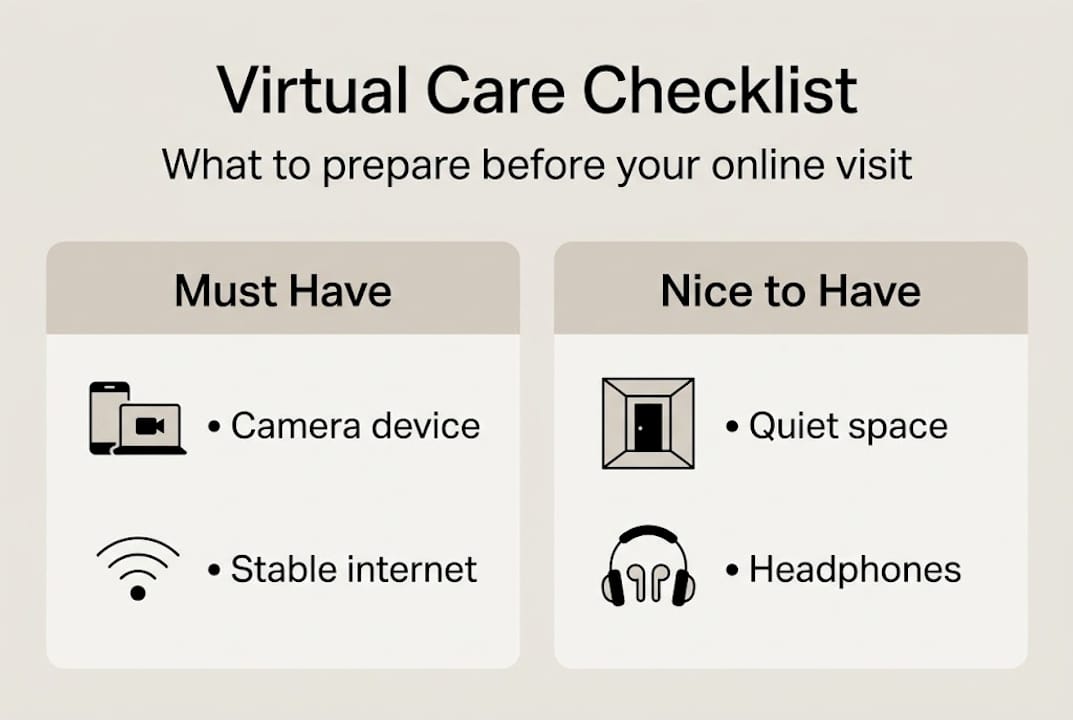
Quick comparison: Required vs. optional setup items
| Item | Required | Optional |
|---|---|---|
| Device with camera and mic | Yes | |
| Stable internet (5+ Mbps) | Yes | |
| Private, quiet space | Yes | |
| Headphones or earbuds | Yes | |
| External webcam | Yes | |
| Printed symptom notes | Yes | |
| Insurance card | Recommended |
Pro Tip: Run two quick checks before your visit. First, click the appointment link your provider sends to confirm it opens correctly. Second, open your camera and microphone settings to make sure they’re enabled for your browser or app. Doing this 30 minutes early prevents last-minute panic.
Step-by-step virtual care setup process
Once your tools and environment are ready, follow these practical steps to launch your virtual care visit.
The intake form is your starting point. Most platforms send it when you book. Fill it out carefully because your provider uses it to prepare for your appointment. Inaccurate or incomplete forms can slow things down or lead to less personalized care.
Step-by-step setup checklist:
- Gather your information. Collect your medication list, symptom timeline, insurance details, and a photo ID.
- Complete your intake forms. Fill these out as soon as you receive them, not the morning of your visit.
- Test your technology. Check your camera, microphone, and internet speed at least one day before.
- Prepare your questions. Write down two or three specific things you want to discuss so you don’t forget in the moment.
- Join early. Join 10-15 minutes early via your provider’s link to handle any last-minute tech issues without stress.
For more virtual care visit tips on what to expect during your session, including how providers handle prescriptions and follow-ups, it helps to read up beforehand. Families especially benefit from knowing the process in advance. The benefits for busy families are real, from avoiding sick waiting rooms to scheduling around school pickups.
Self-led vs. provider-guided setup comparison:
| Setup type | Pros | Cons | Best for |
|---|---|---|---|
| Self-led | Flexible, fast, no waiting | Requires tech confidence | Tech-comfortable users |
| Provider-guided | Supportive, step-by-step help | May take longer to start | First-timers, seniors |
The step-by-step Healthline guide also offers a clear walkthrough if you want a second reference before your visit.
Pro Tip: If your home Wi-Fi is unreliable, use your phone’s mobile hotspot as a backup. Turn it on before the visit starts so you can switch over instantly if your connection drops.
Affordable providers: Choosing the right virtual care service
Before you pick a provider and request your appointment, compare the most affordable and reliable virtual care platforms. Not all telehealth services are built the same, and price differences can be significant.
Here’s a breakdown of popular options for non-emergency care:
- Sesame: Best for uninsured patients. Sesame offers visits for $37-47 with cash pay and no insurance required. Transparent pricing means no surprises.
- Amwell: Accepts most major insurance plans. Good for patients who want their coverage applied. Out-of-pocket costs vary by plan.
- GoodRx Care: Offers visits under $20 for certain conditions, making it one of the lowest-cost options available.
For a broader look at your options, the popular service comparison from Everyday Health breaks down features, costs, and specialties across leading platforms.
What to look for when choosing:
- Transparent, upfront pricing with no hidden fees
- Same-day or next-day availability
- Licensed providers in your state
- Clear refund or reschedule policies
- Secure, HIPAA-compliant platform
The average virtual visit costs $47 or less with leading low-cost providers, which is a fraction of what most urgent care clinics charge without insurance. If you want a deeper look at how to manage healthcare costs, the care without insurance guide covers practical strategies. You can also explore telemedicine benefits for budgets to understand the full financial picture.
Most top platforms also make scheduling simple. You can often book, complete intake, and connect with a provider in under an hour, all without leaving home.
Troubleshooting and overcoming common virtual care hurdles
Even with the best setup, issues can happen. Here’s how to solve the most common ones before they disrupt your appointment.
The four most common obstacles:
- Connectivity issues: Your video freezes or drops. Fix it by moving closer to your router, closing unused apps, or switching to your phone’s hotspot.
- Trouble with links or apps: The appointment link doesn’t open. Try a different browser (Chrome and Firefox tend to work well) or download the provider’s app directly.
- Limited digital skills: 55% of older adults report difficulty with telehealth technology, and tech glitches affect 45% of first-time users. You’re not alone, and most platforms have live support.
- Privacy concerns: Use a private room, wear headphones, and confirm your platform is HIPAA-compliant before sharing personal health details.
Research on digital access challenges shows that barriers are real, especially for older and rural populations. Understanding this helps you plan ahead rather than troubleshoot in the moment. Additional insights on overcoming the digital divide highlight why audio-only options exist and how they help.
Important: Virtual care is not for sudden emergencies. If you’re experiencing chest pain, difficulty breathing, severe bleeding, or any life-threatening symptom, call 911 or go to your nearest emergency room immediately. Telehealth is designed for non-emergency, manageable health concerns.
For a balanced look at what works and what doesn’t, the virtual care pros and cons breakdown is worth reading before your first visit.
Audio-only fallback is a valid and practical option when video fails. Many providers can still complete a thorough consultation by phone, especially for symptom reviews, prescription refills, and mental health check-ins.
Pro Tip: If you get stuck at any point, most telehealth platforms offer live tech chat or a support phone line. Don’t wait until your appointment time to ask for help. Reach out as soon as you notice a problem.
Our take: What most guides miss about virtual care setup
Most telehealth setup guides hand you a checklist and call it done. What they skip is the emotional reality for someone who has never done this before, especially older adults, people in rural areas, or anyone who didn’t grow up with smartphones.
The digital divide persists across older, rural, and low-income populations. That’s not a minor footnote. It’s a barrier that determines whether telehealth actually helps or just adds another layer of frustration.
The uncomfortable truth is that telehealth platforms are often designed for people who are already comfortable with technology. Audio-only options and phone-based support exist, but they’re rarely promoted. They should be the first thing mentioned, not the last resort.
The best virtual care experience starts with providers who ask about tech comfort upfront, offer plain-language guides, and make it easy to call in if video doesn’t work. That’s what real accessibility looks like. The pros and cons of telehealth are real on both sides, and acknowledging the friction is the first step toward fixing it. The promise of virtual care is only fulfilled when cost and technical barriers come down together.
Next steps: Finding fast, affordable virtual care
Ready to book your first visit or compare care plans? Chameleon makes it simple and transparent.
At Chameleon Healthcare, you don’t need insurance to get quality care. Whether you’re dealing with a sore throat, a rash, or something like care for low back pain, licensed providers are available same-day with clear, upfront pricing. You can explore Chameleon virtual care plans to find the option that fits your needs and budget, whether that’s a single visit or a membership. If you have questions about getting set up or want to talk through your options, connect with Chameleon today. Real care, no waiting room required.
Frequently asked questions
Is virtual care safe and private?
Yes. When you use a HIPAA-compliant platform and take basic steps like using a private space and secure Wi-Fi, your health information stays protected throughout your visit.
What health issues can I address with a virtual visit?
Virtual care works well for non-emergency needs like prescription refills, minor illnesses, mental health support, and follow-up visits. Telehealth is limited compared to in-person care for physical exams or serious emergencies.
What if I have trouble connecting during my virtual appointment?
Restart your device or router first. If video still won’t work, audio-only fallback is a practical and accepted alternative, or contact your provider’s tech support line right away.
Is virtual care cheaper than in-person visits?
In most cases, yes. Cash-pay services like Sesame offer visits for $37-47 and GoodRx Care can go under $20, which is significantly less than a typical urgent care or office visit without insurance.