

TL;DR:
- Online healthcare visits are cheaper and quicker than traditional urgent care, costing $40-$100.
- Preparation includes having a device, quiet space, symptom list, medications, ID, and payment ready.
- Telehealth is best for minor conditions and complements, not replaces, in-person emergency care.
Your kid wakes up with a sore throat on a Tuesday morning, or you’ve had a nagging sinus pressure for three days and can’t afford to sit in a waiting room for two hours. Sound familiar? Traditional healthcare has a way of making simple problems feel complicated, especially when insurance costs and long waits stack up. Online healthcare visits change that equation. Telehealth visits often cost $40 to $100, compared to $200 or more at urgent care, and you can book one in minutes from your phone. This guide walks you through everything you need to prepare, choose a platform, book your visit, and know what comes next.
Table of Contents
- What you need before scheduling an online visit
- Choose the right online healthcare platform
- Step-by-step: How to schedule your virtual healthcare visit
- Troubleshooting, limits, and maximizing your visit’s value
- What to expect after your online healthcare visit
- Our take: The reality of online healthcare for busy families
- Connect with fast, affordable care now
- Frequently asked questions
Key Takeaways
| Point | Details |
|---|---|
| Minimal requirements | You only need a smart device, internet, and a private space to book and attend an online healthcare visit. |
| Affordable visits | Most online pay-per-visit options cost between $40 and $100, making them cheaper than urgent care even without insurance. |
| Quick, simple booking | You can schedule a consult with just a few taps—no insurance obstructions, and appointments may be same-day. |
| Know the limits | Online care is best for minor illnesses and follow-up, but not emergencies or complex diagnoses. |
| Prep for success | Proper tech and symptom prep greatly improve your appointment and reduce missed visits. |
What you need before scheduling an online visit
Now that you know efficient solutions exist, let’s walk through exactly what you’ll need to get started. The good news is that the setup is simple, and a little preparation goes a long way toward a smooth, productive appointment.
First, make sure you have the right technology. You’ll need a device with a working camera and microphone, whether that’s a smartphone, tablet, or laptop. A stable internet connection matters too. A dropped call mid-consultation wastes everyone’s time and can leave you without answers. Find a quiet, well-lit, private space where you feel comfortable discussing your health openly.
Beyond tech, gather a few key items before you log on:
- A written list of your current symptoms and when they started
- All medications you’re taking, including supplements and over-the-counter products
- Known allergies, especially to medications
- A valid photo ID and a payment method (credit card, debit card, or HSA card)
- Any relevant medical history, like past diagnoses or recent test results
Having this ready prevents awkward pauses and helps the provider give you better, faster care. Review these tips for online visit prep to feel fully confident before your appointment.
| Requirement | Why it matters |
|---|---|
| Camera and microphone | Provider needs to see and hear you clearly |
| Stable internet (WiFi preferred) | Prevents disconnections during the visit |
| Private, quiet space | Protects your privacy and focus |
| Symptom list and med history | Speeds up diagnosis and reduces errors |
| Payment method ready | Most platforms require upfront payment |
Following an official telehealth prep guide, experts recommend testing your device 15 minutes early, securing a well-lit space, and completing intake forms in advance.
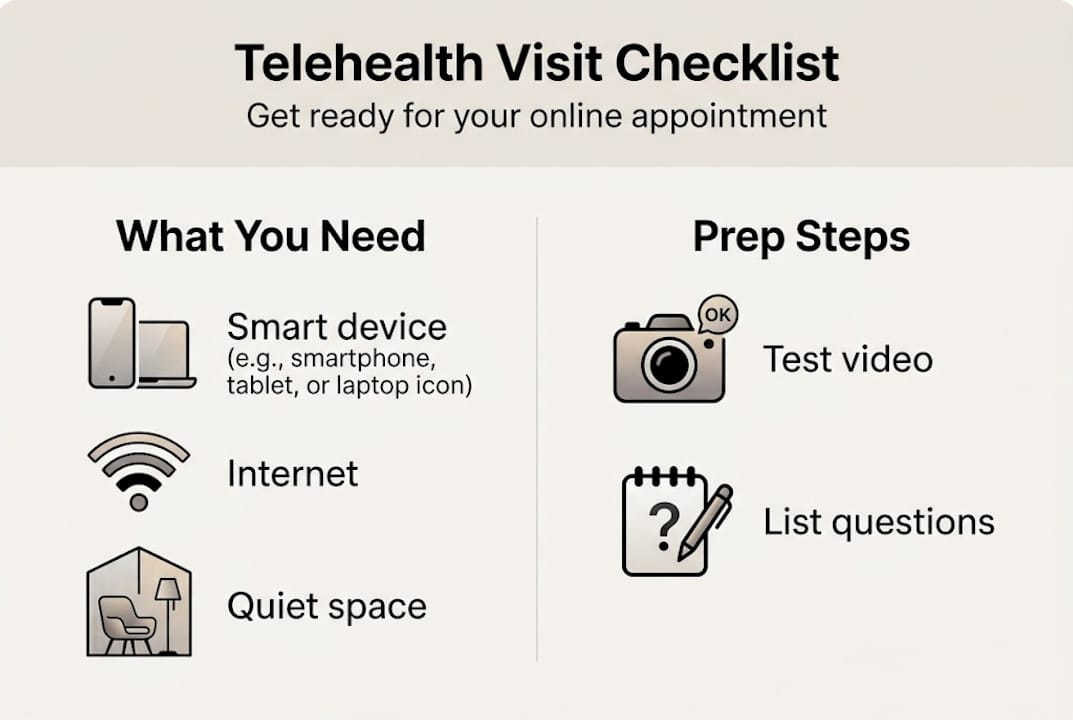
Pro Tip: Open your platform’s app or website 15 minutes before your visit to test audio and video. Jot down your top two or three questions so you don’t forget them once you’re on the call.
You can also explore virtual care treatments available online to know exactly what conditions your visit can address.
Choose the right online healthcare platform
Once you’re prepared, your next step is picking the most convenient and cost-effective platform for your needs. Not all telehealth services are built the same, and the right fit depends on your budget, urgency, and the type of care you need.
Here’s a quick look at three popular options:
| Platform | Cost (no insurance) | Visit type | Best for |
|---|---|---|---|
| Sesame | $37 to $47 per visit | Scheduled | Budget-conscious users, transparent pricing |
| Amwell | $79 for urgent care | On-demand or scheduled | Families needing quick access |
| Teladoc | $89 per visit | On-demand | Broad service range, mental health |
Popular platforms for uninsured users include Sesame, which uses a marketplace model with transparent pricing and no insurance needed, Amwell at $79 for urgent care, and Teladoc at $89 per pay-per-visit. If cost is your biggest concern, Federally Qualified Health Centers (FQHCs) offer free or sliding-scale visits based on income. You can find one near you through 211.org.

For families, a platform with pediatric options and flexible scheduling is often worth a slightly higher price. Solo users dealing with a one-time issue might prefer an on-demand service with no subscription required.
Before you commit, check these key factors:
- Price per visit and whether a membership saves you money long-term
- Services offered, including mental health, urgent care, and primary care
- State restrictions, since providers must be licensed in your state
- Privacy policy and whether the platform is HIPAA-compliant
- Speed of access, on-demand versus next-day scheduled slots
You can compare telehealth platforms side by side to find your best match, or read more about affordable care without insurance to understand your full range of options.
Step-by-step: How to schedule your virtual healthcare visit
Armed with your ideal platform, here’s the exact process you’ll follow to book and attend your first virtual visit.
- Go to your chosen platform’s website or app and create a free account using your email address.
- Select the type of care you need, such as urgent care, primary care, or mental health.
- Choose a provider or on-demand slot. Some platforms let you pick a specific doctor; others match you automatically.
- Complete the intake form. Describe your symptoms clearly and list your medications and allergies.
- Pay upfront. Most platforms accept credit cards, debit cards, and HSA or FSA cards.
- Confirm your appointment and watch for an email or text reminder with your visit link.
- Log in 15 minutes early on the day of your visit to test your camera, microphone, and internet connection.
Scheduling online healthcare visits follows this straightforward flow: select a platform, create an account, choose a service, pick a slot, pay upfront, and join via video or phone after preparing your tech and medical info.
Pro Tip: Book early in the day when more time slots are available. Evening slots fill up fast, especially for on-demand urgent care.
Important: Virtual care is not for emergencies. If you’re experiencing chest pain, difficulty breathing, severe bleeding, or any life-threatening symptoms, call 911 or go to the nearest emergency room immediately.
For more context on what to expect, check out this online healthcare booking overview or learn how same-day online visits work for busy parents.
Troubleshooting, limits, and maximizing your visit’s value
Once you’ve completed the booking steps, you’ll want to make sure your visit runs smoothly. Here’s how to sidestep common pitfalls.
Tech issues are the most common source of frustration. If your video freezes or audio cuts out, try these quick fixes:
- Restart your app or browser and rejoin the session
- Switch from WiFi to mobile data (or vice versa) if your connection is unstable
- Close other apps or browser tabs that may be using bandwidth
- Check your camera and microphone permissions in your device settings
- Restart your device if nothing else works
Beyond tech, telehealth has real limits. Providers cannot perform physical exams or order in-office labs remotely. State licensure rules mean your provider must be licensed where you live, so confirm this before booking. Always use a HIPAA-compliant platform to keep your health data private and protected.
Know when to go in person: Virtual care works well for colds, UTIs, skin rashes, and mental health check-ins. But if your symptoms are worsening rapidly, involve high fever in a young child, or are unclear, an in-person visit or emergency room may be the safer choice.
To get the most value from your visit, come with specific questions ready. Ask about next steps, red flags to watch for, and whether a follow-up is needed. Keeping a personal record of your visit notes and any prescriptions issued helps you stay organized. You can review the telehealth pros and cons and explore telemedicine explained for a fuller picture of what virtual care can and can’t do.
What to expect after your online healthcare visit
After your online appointment, here’s what you can expect so there are no surprises for you or your family.
Most platforms send a visit summary to your email within a few hours. This typically includes your diagnosis, treatment plan, and any follow-up instructions. If your provider ordered a prescription, it’s usually sent electronically to your chosen pharmacy the same day.
Here’s a quick checklist of things to review after your appointment:
- Check your email for your visit summary and any attached documents
- Confirm your prescription was sent to the right pharmacy
- Review lab orders if any were requested, and find a local lab to complete them
- Save your doctor’s note if you need one for work or school
- Note any follow-up instructions and schedule a follow-up visit if recommended
| Post-visit action | What to expect |
|---|---|
| Prescription | Sent electronically to your pharmacy, usually same day |
| Lab orders | Sent to you or a local lab; you complete them in person |
| Doctor’s note | Available via platform portal or email |
| Follow-up visit | Booked through the same platform or referred elsewhere |
| Visit summary | Emailed within hours; keep it for your records |
Telehealth utilization stabilized at 4 to 6% of all medical visits after its 2020 peak, with mental health visits remaining higher at around 29%. Urban patients use telehealth at 2.4 times the rate of rural patients, and payment parity policies boost usage further. Understanding these trends helps you see that telehealth is a mainstream, reliable option, not a workaround. Explore the telemedicine benefits that make it a practical fit for ongoing family care.
Our take: The reality of online healthcare for busy families
Seeing how the process works end-to-end, let’s offer some honest perspective about where scheduling virtual visits shines and where it doesn’t.
Families get the most out of telehealth when they use it for what it does best: colds, basic infections, minor skin issues, mental health check-ins, and straightforward urgent needs. For these situations, skipping insurance and booking online is genuinely a game-changer. You save time, money, and stress.
But platform selection is where many people stumble. Choosing the cheapest option without checking state restrictions or service range can leave you frustrated. Take five minutes to vet your platform before you commit.
AI-assisted triage and smarter scheduling tools are closing access gaps, but disparities between urban and rural users, older patients, and those with complex needs are still real. Telehealth is a powerful tool, not a perfect one. Treat it as one part of your healthcare approach, not your only option. Always have a backup plan, whether that’s a local urgent care clinic or a primary care provider you can reach when virtual care isn’t enough. Review the pros and cons of virtual care and explore affordable doctor visits to build a strategy that works for your whole family.
Connect with fast, affordable care now
Ready to put this into action? Chameleon Healthcare makes it easy to get the care you need without the wait, the paperwork, or the insurance headaches.
Whether you’re managing online care for asthma, dealing with sudden nausea or telehealth for vomiting, or just need a quick check-in for a common illness, our licensed providers are ready to help the same day. For families who want ongoing peace of mind, our virtual care plans offer flexible, affordable membership options that make regular care simple and budget-friendly. No insurance required, no waiting room, and no unnecessary stress. Just straightforward, compassionate care built around your schedule.
Frequently asked questions
How much does an online healthcare visit cost without insurance?
Online visits typically range from $40 to $100, with platforms like Sesame starting at $37, Amwell at $79, and Teladoc at $89 per visit, depending on the service type.
Is online healthcare secure and private?
Leading telehealth platforms use HIPAA-compliant systems to protect your health information, so your data stays private and secure throughout your visit.
Can I get prescriptions or doctor’s notes from a virtual visit?
Most online providers can issue prescriptions and doctor’s notes when clinically appropriate, with prescriptions sent electronically to your chosen pharmacy the same day.
What if I need lab tests or an in-person exam?
Virtual care can order labs or refer you to a specialist, but cannot perform physical exams; for emergencies or complex needs, visit a clinic or emergency room.
Will my insurance cover online healthcare visits?
Many telehealth platforms, including those with transparent, no-insurance pricing, allow you to pay out of pocket; coverage varies by state and platform if you do have insurance.