

TL;DR:
- Enrolling employees in virtual care programs during open enrollment maximizes sign-up rates through effective communication and simple onboarding.
- A smooth registration process, scenario-based messaging, and leadership support improve long-term utilization and trust.
Enrolling employees in virtual care is the process of activating your workforce on a telehealth platform so they can access licensed medical providers online, without waiting rooms or insurance friction. Done well, it reduces absenteeism, cuts healthcare costs, and gives your team same-day access to care for conditions ranging from sinus infections to anxiety. Platforms like Included Health, Firefly Health, and Kaiser Permanente have shaped how employers think about this benefit. The steps to enroll in virtual health are straightforward, but timing, communication, and access design make the difference between a benefit employees actually use and one they forget exists.
How to enroll employees in virtual care: start with timing
The single most effective time to enroll employees in virtual care is during annual plan renewal and open enrollment. Mid-year additions yield lower adoption because they lack the high-visibility communication push that open enrollment naturally creates. Employees are already paying attention to their benefits at that moment. That attention is your best asset.
Open enrollment gives you a concentrated window to introduce telehealth as a real, usable benefit rather than a footnote in a benefits packet. Use that window deliberately. Effective open enrollment communication includes benefits videos, wallet cards, manager briefings, and email reminders. These modest investments produce measurable improvements in utilization.
Here is what a strong enrollment communication plan looks like during open enrollment:
- Dedicated benefits sessions: Hold live or virtual sessions focused specifically on how to sign up for telemedicine, not buried in a general benefits overview.
- Video demos: A two-minute walkthrough of the platform login and first visit removes the uncertainty that stops employees from trying it.
- Wallet cards or digital quick-start cards: Give employees something they can reference the first time they need care at 10 p.m. on a Tuesday.
- Manager briefings: Train managers to mention the benefit in team meetings. Peer-level reminders carry more weight than HR emails alone.
- Email reminders with real scenarios: Send two or three emails during the enrollment window. Each one should describe a specific situation where virtual care saves time and stress.
Pro Tip: Before contracting a new telehealth vendor, audit your current health plan. Employers often pay for duplicate platforms without realizing their existing carrier already includes virtual care. A quick review of your carrier’s utilization report can save thousands of dollars annually.
What does the digital onboarding process actually look like?

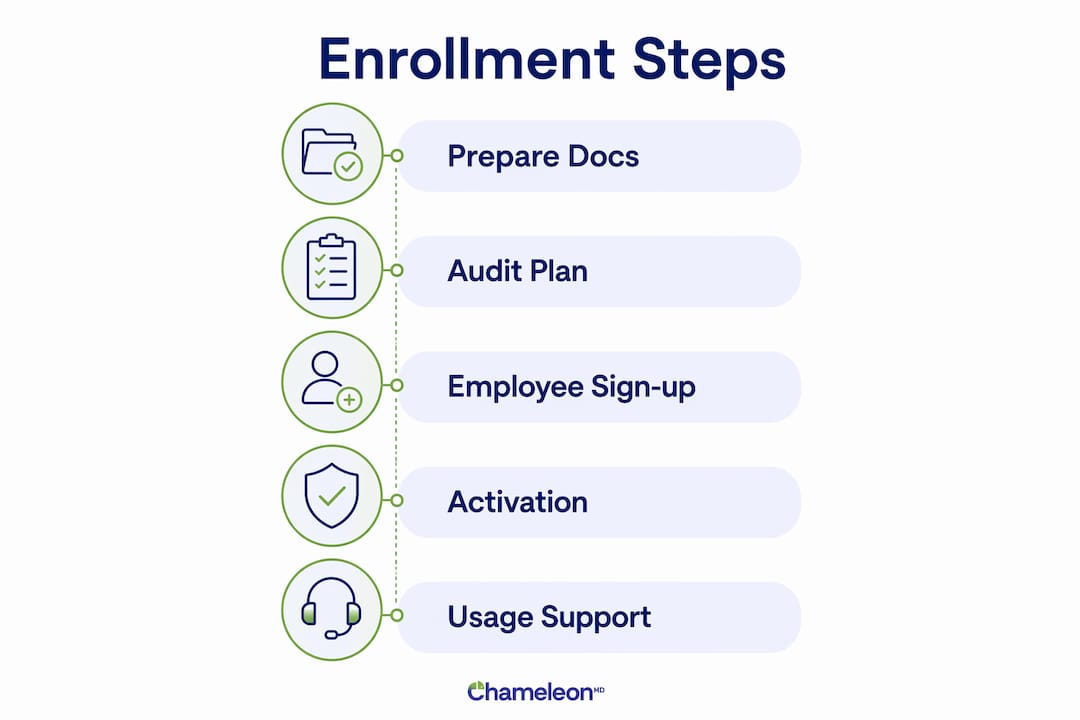
Once employees decide to register for telehealth, the onboarding process is straightforward. The digital onboarding process includes creating an account, submitting personal health information, choosing a primary care provider, and scheduling a first visit. Employees who have their health history ready complete setup in roughly 10–15 minutes.
Here is the step-by-step process your employees will follow:
- Create an account. Employees register using an email address and a secure password. Some platforms allow phone-number-based registration, which matters for workers without corporate email access.
- Submit personal health information. This includes current medications, known health conditions, allergies, and insurance details if applicable. The platform stores this data securely for future visits.
- Choose a primary care provider. Employees can browse available providers by specialty, language, or availability. Selecting a preferred provider creates continuity across visits.
- Add family members. Most platforms allow employees to add dependents during onboarding. This is a significant benefit for parents and caregivers. Flexible family access policies improve enrollment rates across all workforce demographics.
- Download the app or save the link. Some platforms require an app download. Others work entirely through a browser link. Browser-based access removes a friction point for employees who are reluctant to add another app.
- Schedule or start a first visit. Employees can book an appointment or, on platforms with on-demand care, connect with a provider immediately.
Pro Tip: Encourage employees to gather their current medication list and a brief summary of any ongoing health concerns before their first appointment. Preparation for the first virtual visit takes about 10–15 minutes when health history is ready, and it makes that first experience noticeably smoother.
How do you communicate virtual care benefits so employees actually use them?
Most employees undervalue telehealth until they use it for the first time. The goal of your communication strategy is to get them to that first visit. After that, the experience sells itself.
The most effective way to do that is to frame the benefit around situations employees already recognize. Abstract descriptions of “virtual primary care access” do not motivate action. Concrete scenarios do.
- A child wakes up with a fever at 11 p.m. and a parent can see a provider in 20 minutes without leaving home.
- An employee needs a prescription refill but cannot get a same-day appointment with their regular doctor.
- Someone is dealing with anxiety but cannot take time off work for an in-person therapy session.
- A remote worker in a new state needs care but has not established with a local provider yet.
“Employees do not use benefits they do not understand. Your job is to make virtual care feel real before they need it.” This is the core principle behind every successful guide to employee virtual care.
Leadership endorsement significantly improves adoption rates. When a CEO or department head shares a personal story about using telehealth, it removes the stigma and validates the benefit as legitimate medical care. Ask two or three leaders to record a short video or send a personal email during open enrollment.
Equity in communication matters as much as the message itself. Removing corporate email requirements and extending access to family members improves utilization among deskless, remote, and shift workers who are often excluded by standard enrollment flows. If your workforce includes warehouse staff, field technicians, or part-time employees, your registration process must work on a personal phone with a personal email address.
What are the most common pitfalls when registering employees for telehealth?
Several predictable mistakes reduce enrollment rates and limit the long-term value of a virtual care benefit. Knowing them in advance saves you time and budget.
Virtual care platforms that require app downloads or complex logins reduce uptake among non-desk and shift workers. Providing no-login or minimal-login access points dramatically increases utilization. This is not a minor convenience issue. It is a structural equity problem that affects a large portion of most workforces.
Compliance is another area HR teams underestimate. Regulatory compliance for remote employees can require state-level registrations for virtual care providers. Fines can range from $500 to $1,000 per month if foreign qualification is not completed before a provider begins work in a new state. If your team is distributed across multiple states, verify that your telehealth vendor holds the appropriate licenses in each state where employees live.
| Challenge | Best Practice |
|---|---|
| Complex portal logins | Use platforms with single-sign-on or phone-number-based access |
| App download required | Choose vendors offering browser-based access as a fallback |
| Corporate email-only registration | Allow personal email or phone number for account creation |
| Duplicate telehealth contracts | Audit existing carrier benefits before signing new vendor agreements |
| Excluding non-desk workers | Select platforms designed for whole-workforce access |
| Multi-state compliance gaps | Confirm provider licensure in every state where employees are located |
The audit point deserves emphasis. Many HR teams sign contracts with standalone telehealth vendors without checking whether their existing health insurance carrier already includes virtual care. That oversight creates duplicate costs with no added benefit to employees.
Key Takeaways
Successful virtual care enrollment requires strategic timing, a clear digital onboarding process, equity-focused access design, and communication grounded in real employee scenarios.
| Point | Details |
|---|---|
| Time enrollment strategically | Launch during open enrollment to capture peak employee attention and maximize sign-up rates. |
| Simplify digital onboarding | Employees complete setup in 10–15 minutes when health history is ready and access is frictionless. |
| Use scenario-based communication | Frame telehealth around real situations like sick children at night or same-day prescription refills. |
| Secure leadership endorsement | Executive support significantly increases employee trust and adoption of virtual care benefits. |
| Audit before you add | Review existing carrier benefits to avoid paying for duplicate telehealth platforms. |
What I have learned from watching enrollment programs succeed and fail
The HR teams that get virtual care enrollment right share one habit: they treat it like a product launch, not a checkbox. They build anticipation before open enrollment, train managers to carry the message, and measure utilization in the first 90 days. The teams that struggle treat it like a form to distribute.
The equity gap is the part most guides skip over. A benefit that works beautifully for office employees but fails for warehouse staff or remote contractors is not a whole-workforce benefit. It is a partial benefit with a perception problem. Removing barriers like app requirements is not a technical detail. It is a decision about who your organization actually cares about.
I also think HR leaders underestimate how much the first experience shapes long-term use. An employee who has a smooth, fast, helpful first virtual visit becomes an internal advocate. They tell their team. That word-of-mouth does more for adoption than any email campaign. So the onboarding process is not just administrative. It is the first impression of a benefit you want people to rely on for years.
Post-enrollment monitoring matters more than most plans account for. Track utilization by department and workforce type in the first quarter. If one segment shows near-zero use, the access design is the problem, not the employees. Fix the friction point and re-communicate directly to that group.
— Vector
Chameleonhc makes virtual care enrollment simple for your team
Chameleonhc is built for exactly the kind of access your employees need: same-day care, clear pricing, and no insurance required. Whether your team needs help with common conditions like sore throats, rashes, or infections, or ongoing primary care support, Chameleonhc connects them with licensed providers from any phone or computer.
HR teams choose Chameleonhc because enrollment is genuinely simple and access works for every type of employee, including remote workers, shift workers, and employees without corporate email. Family care is built in, not bolted on. Explore Chameleonhc’s virtual care plans to find the right fit for your organization and give your team a benefit they will actually use.
FAQ
When is the best time to enroll employees in virtual care?
The best time is during annual open enrollment. Mid-year rollouts yield lower adoption because they lack the focused communication push that open enrollment provides.
How long does employee onboarding for virtual care take?
Setup takes roughly 10–15 minutes when an employee has their health history and medication list ready. The process covers account creation, health information submission, and provider selection.
What stops employees from using virtual care after enrollment?
Complex logins, mandatory app downloads, and corporate email requirements are the top barriers. Platforms requiring app downloads see significantly lower utilization among shift and non-desk workers.
Do employers need to check compliance before offering virtual care?
Yes. Remote employees may trigger state registration requirements for telehealth providers, with fines ranging from $500 to $1,000 per month for non-compliance.
How do you increase employee adoption of telehealth benefits?
Frame the benefit around concrete scenarios like late-night sick visits or quick prescription refills. Pair that messaging with leadership endorsement, which significantly increases employee trust and willingness to use virtual care.